|
|










© Copyright 2024 Quantum Marketing Group. All Rights Reserved.
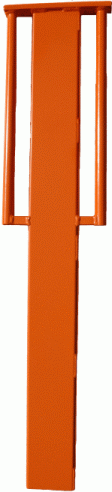
D-375 Post Driver For Composite Markers
When installing Quantum Flex™ Markers, it is recommended that you use a Quantum Flex
D-375 post driver. The driver is easy to use and greatly reduces the installation time. The D-375
post driver will fit both the QM-375 and the QM-250 marker profile. No need to carry 2 separate
installation tools if working with both marker styles. The D-375 post driver holds the marker
rigid during the installation process, preventing the marker from flexing. This concentrates the
driving energy through the marker into the soil thereby allowing the marker to be driven into
very hard soil conditions.
Quantum Drivers are made in the USA and are constructed of welded steel with a bright high visible orange powder coat finish for durability. The driver weighs 25 pounds, is 45 inches in length and has easy grip handles for ease of handling.
Quantum Drivers are made in the USA and are constructed of welded steel with a bright high visible orange powder coat finish for durability. The driver weighs 25 pounds, is 45 inches in length and has easy grip handles for ease of handling.
Installation Instructions
For
QM-375 & QM-250
Composite Markers
For
QM-375 & QM-250
Composite Markers
Driver Dimensions
Outside Dimensions:
Length: 44 inches
Total Width: 10 inches
Handle Length: 20 inches
Length: 44 inches
Total Width: 10 inches
Handle Length: 20 inches
Inside Sleeve Dimensions:
4 1/16” X 5/8”
4 1/16” X 5/8”
ALWAYS WEAR PROPER SAFETY EQUIPMENT INCLUDING
PROTECTIVE EYEWEAR, GLOVES, BOOTS AND SAFETY VEST
PROTECTIVE EYEWEAR, GLOVES, BOOTS AND SAFETY VEST
Step 1: Remove marker from packaging and insert into driver with pointed end exposed.
Step 2: Turn driver and marker to vertical and plumb position. Installer should always be facing on coming traffic.
Step 3: Drive marker into the ground with light taps. Bracing your foot against the post may help stabilize the marker.
Step 2: Turn driver and marker to vertical and plumb position. Installer should always be facing on coming traffic.
Step 3: Drive marker into the ground with light taps. Bracing your foot against the post may help stabilize the marker.